 Knotenhirn
Giving Claude Code a memory for your team
Updated 6 November 2026 · by Michael Schwarz
Claude Code gets a memory for your team when you capture the knowledge in your heads in one place that Claude Code can search itself. With Knotenhirn, that place is a shared knowledge base with a built-in MCP server: you connect Claude Code with one command, and from then on it looks there for decisions, edge cases and agreements, and records new findings as notes itself. Your wiki and your CLAUDE.md stay as they are.
Why Claude Code does not know the why
Claude Code reads your code thoroughly. It sees what the code does. Why it does it that way is rarely written there. Why an interface expects amounts in cents, why one customer gets special treatment, or why you deliberately do not update a library: usually one person on the team knows, and it is in no file.
Every session starts without this knowledge. You explain the same background again and again, or Claude Code makes a suggestion that is technically clean and still brings back an old bug. That is not the model's fault. It is missing the part of your knowledge that nobody ever wrote down.
What CLAUDE.md and the wiki already do well
A CLAUDE.md in the repository is the right place for rules that apply to every task: how to build and test, which conventions you use, what Claude Code should not touch. Claude Code reads it at every start. Your wiki holds the documentation people read at their leisure: architecture, processes, handbooks. Both remain important.
The trouble is the knowledge in between. Hundreds of small decisions and edge cases do not fit into a file that is loaded in full at every start. They are often too small for a wiki page of their own, and nobody maintains them there. So they stay in heads, in chats and in old tickets. That is exactly the knowledge Claude Code is missing.
A memory that Claude Code consults itself
Knotenhirn is a hosted team memory for AI agents with a built-in MCP server. People write short notes in the browser, and Claude Code reads and writes the same notes via MCP. The memory is not loaded in full at every start; it is searched in a targeted way when a task needs it. For this, Claude Code gets five tools:
search_team_knowledgefinds notes by words and meaning, before the agent looks elsewhere.read_noteloads a note in full, with its links and backlinks.save_notecreates a new note and names similar ones that would be better extended.update_notechanges a note or moves it to another group.list_groupsshows the groups in which the agent may store notes.
Claude Code only sees what the connected person may see. Every change appears in the history marked “via MCP”, and earlier versions can be restored. Notes organise themselves into topics, so nobody has to maintain folders.
An everyday example
Someone on the team asks Claude Code what to do when customers are not receiving emails. The code shows how emails are sent. What to check during an outage, and in what order, is not in there. Your team learned that over time and recorded it in Knotenhirn. Claude Code looks there first, answers with those steps and names the notes they come from.
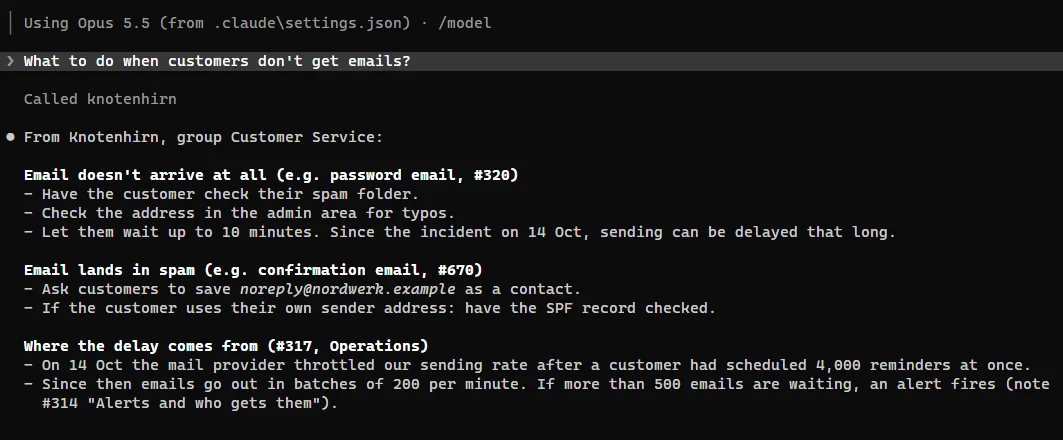
It works the same way when programming. Before Claude Code removes a seemingly redundant check, it finds the note that explains why the check is there. And when you work out together in a session why a test fails only at night, you ask Claude Code to record it. After saving, Knotenhirn names similar notes so Claude Code can extend or merge them instead of leaving duplicates. From then on, every colleague finds it, in the browser and in their own Claude Code.
How to set it up
- Sign in with Microsoft or Google, create your team and share the team link. You approve who joins.
- Connect Claude Code with one line in the terminal:
claude mcp add --transport http --scope user knotenhirn https://knotenhirn.dev/mcp - In Claude Code, run
/mcp, choose knotenhirn and sign in in the browser.
For Claude Desktop, Codex, VS Code and other clients, everything is in the Connect MCP guide. If you like, add a sentence to your CLAUDE.md saying that Claude Code should search Knotenhirn first for questions about the why. That way the two work together.
What belongs in the memory
- Decisions with their reasons: what you chose and what you rejected.
- Edge cases and agreements with individual customers or systems.
- Pitfalls and workarounds that otherwise only one person knows.
- Answers to questions the team asks again and again.
Documentation that people read in one go stays in the wiki. Rules for every task stay in the CLAUDE.md. Knotenhirn takes in what used to get lost in between.
You also see what is still missing: when Claude Code searches for something and finds nothing, Knotenhirn collects these searches under knowledge gaps. So you know which question needs an answer next.
Try it with your team
Try Knotenhirn free for 14 days, with no payment details. The trial does not turn into a subscription automatically.