Team memory for AI agents with an MCP server for Claude & co. Your AI finally knows what your team knows.

Knotenhirn is a hosted team memory for AI agents with a built-in MCP server. Your agents find what your team learns at work, answer with sources and record what is new. Your wiki stays.

Try free for 14 days

  • No payment details needed
  • Sign in with Microsoft or Google, no new password
  • DPA as PDF
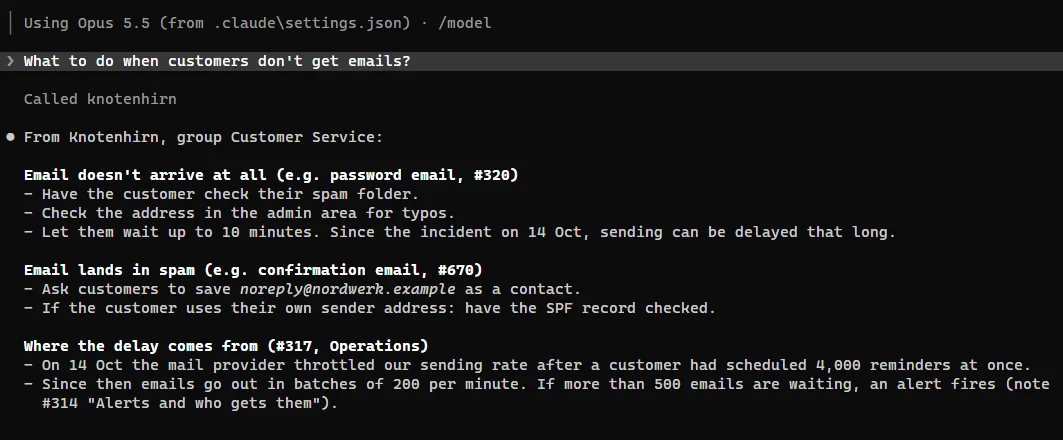
Ask, answer with sources, record what is new: your AI agent with Knotenhirn.

Sound familiar?

  • The AI starts from zero

    Every session with Claude or another AI agent starts without your knowledge. You explain processes, agreements and special cases over and over again.

  • Knowledge is scattered

    It sits in people's heads, chats, tickets and pages nobody can find any more. Anyone who is new or back from holiday has to ask.

  • The wiki holds only what was decided

    Concepts and decisions are in the wiki. What the team learns at work, such as edge cases, agreements and pitfalls, nobody writes down there.

For teams that already work with AI

Knotenhirn pays off most when your team uses Claude or other AI agents every day. Then the agents work with your knowledge instead of starting from zero every time.

  • Support team

    The fix for a recurring request is written down once. Whoever is on duty finds it right away, in the browser or through the AI agent.

  • Sales and projects

    Agreements, requests and lessons from projects in one place. Before the next meeting, you ask the AI agent what was discussed last time.

  • New to the team

    New starters ask the AI agent instead of five colleagues. The answer comes from your knowledge and names its source.

  • Development and IT

    Decisions, how-tos and pitfalls. Claude Code finds them again and records new ones itself.

How it works

  1. Create your team and invite people

    Sign in with Microsoft or Google, create your team and share the team link. You approve who joins.

  2. Connect your AI agent

    For Claude Code, one line is enough. Then run /mcp in Claude Code, choose knotenhirn and sign in in the browser. There is nothing else to set up.

    claude mcp add --transport http --scope user knotenhirn https://knotenhirn.dev/mcp

    For Claude Desktop, Codex, VS Code and other clients: Connect MCP guide.

  3. Record and find knowledge

    From now on, your team remembers what it learns and finds it again: in the browser and in the chat with your AI agent.

More in the guides: how to give Claude Code the why behind your code.

Features

What you record in the browser, your AI uses via MCP, and what the AI learns is there for everyone in the browser.

Your AI asks Knotenhirn

Claude Code, Claude Desktop and other AI agents search your notes via MCP and answer with sources. What they learn, they record as a note themselves.

After saving a note, Knotenhirn names similar notes, so the AI can merge duplicates.

Many notes at once, for example from existing documentation, the AI submits as proposals. You accept, edit or reject them in the browser.

Claude Code answers “What to do when customers don't receive emails?” with steps from Knotenhirn and names the notes as its source

Topics that sort themselves

Notes sort themselves into topics. When a topic grows, Knotenhirn splits it, and every night everything is sorted afresh. Nobody maintains folders.

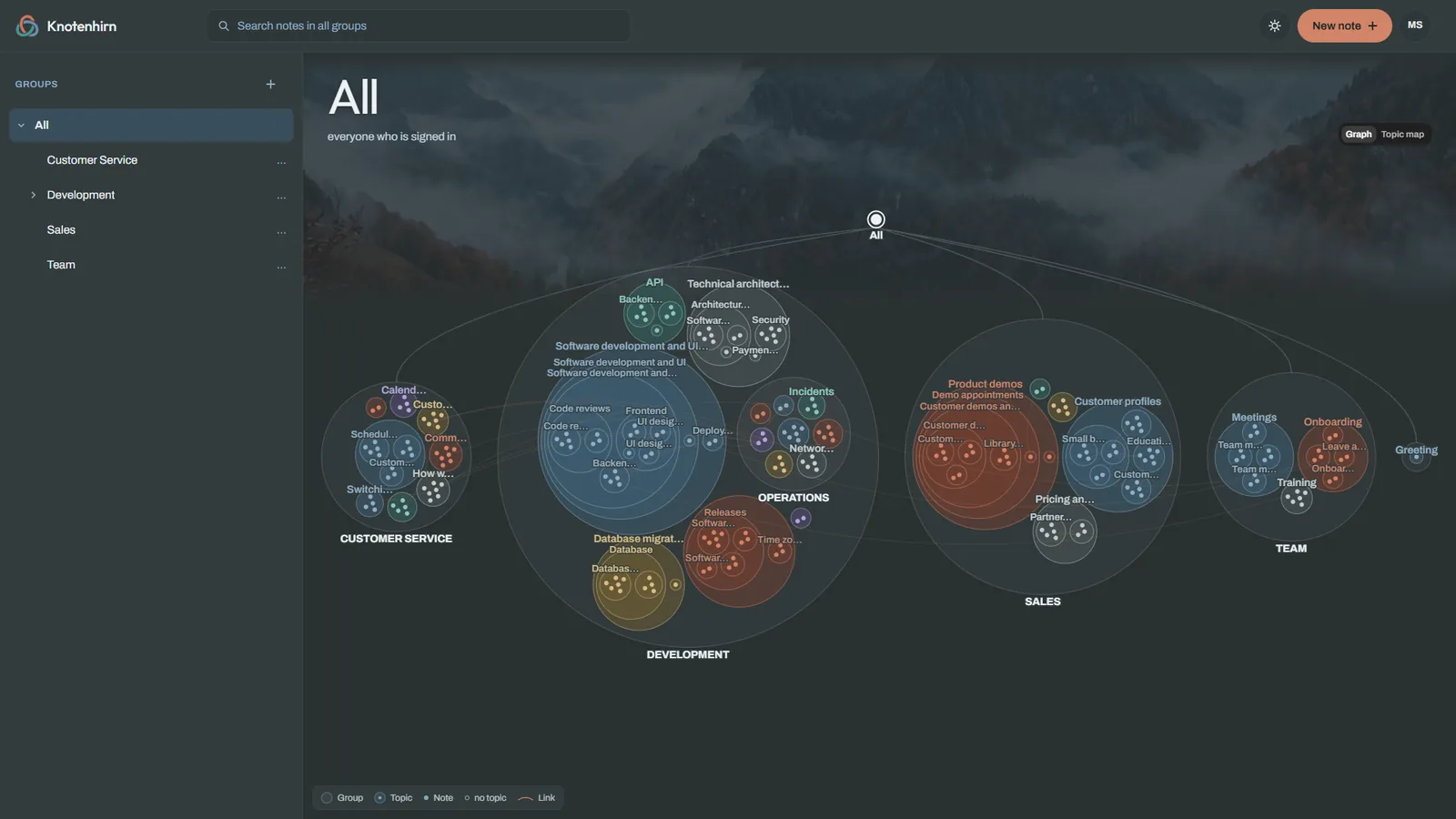
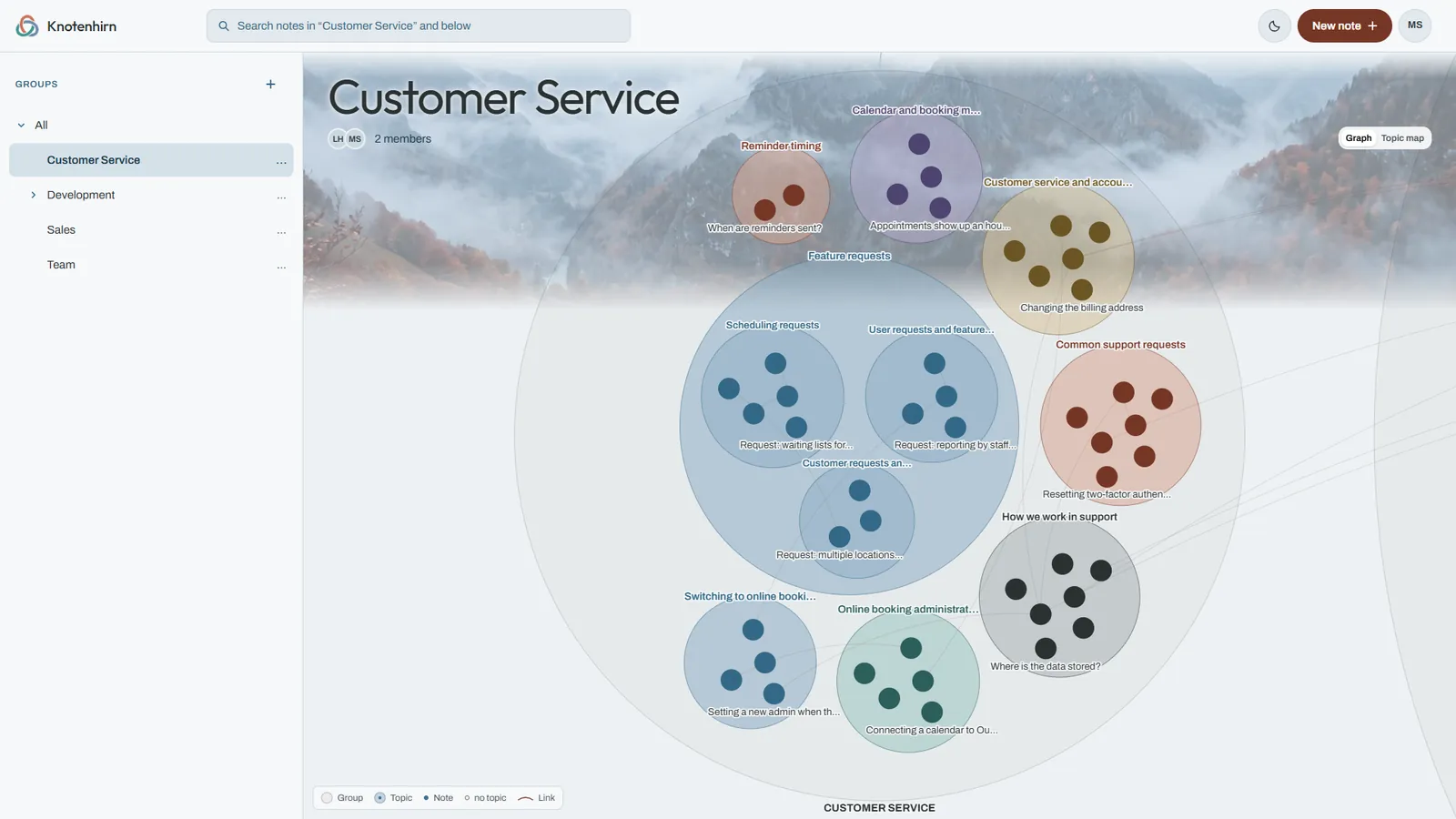
The graph shows groups, topics and notes with their links at a glance. The topic map shows where there is a lot of knowledge and where it runs thin.

A team's graph: groups as large circles, topics and notes inside them as dots, links as lines Graph of the customer service group: topics such as bookings, payments and feature requests with their notes

See knowledge gaps

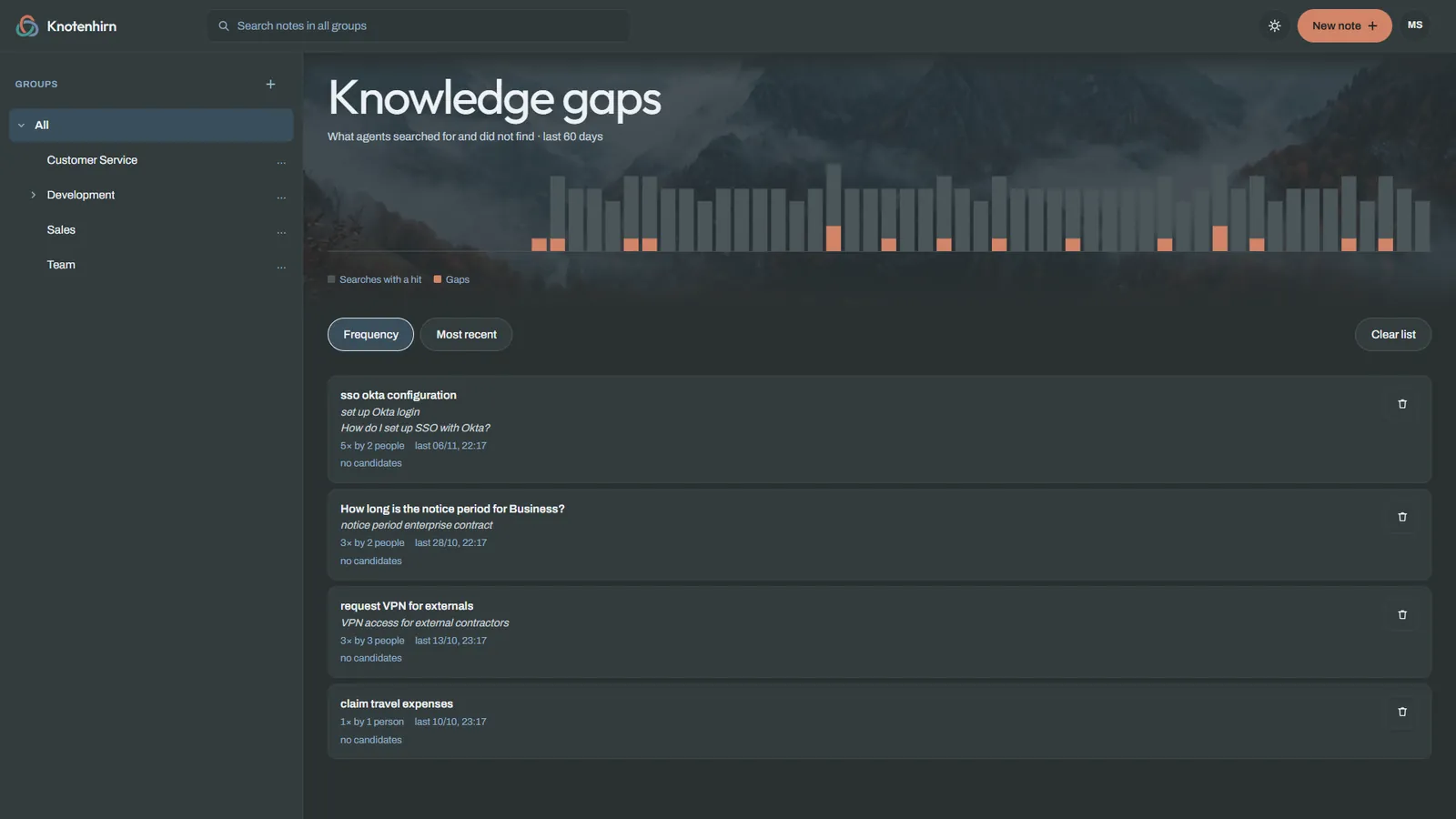
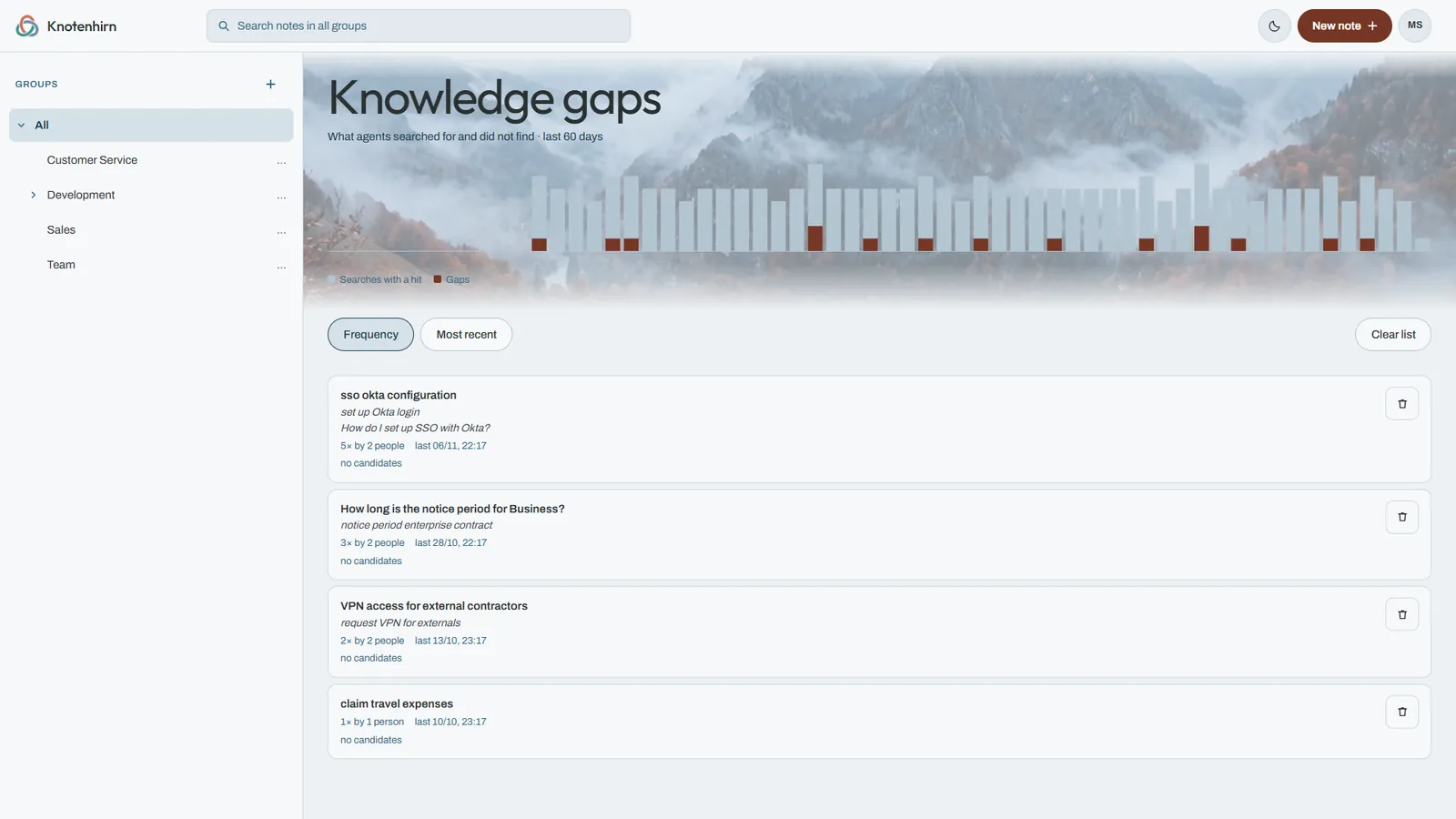
When the AI searches for something and finds nothing, Knotenhirn collects these searches and groups similar questions. That way you see, over 60 days, which knowledge is missing.

The overview counts people but shows no names.

Knowledge gaps page: bars for searches with and without results over the last 60 days, below them questions such as “How do I set up SSO with Okta?” Knowledge gaps page: bars for searches with and without results over the last 60 days, below them questions such as “How do I set up SSO with Okta?”
  • Search by meaning

    Search combines full text and meaning.

  • Every change traceable

    Every version shows who changed it, when, and whether in the browser or via AI.

  • The AI proposes, you approve

    Many notes at once arrive as proposals. Only your approval turns them into team knowledge.

  • Links between notes

    Link notes with [[#ID]]; autocomplete helps as you type.

Try it with your team.

Try free for 14 days

One price, every feature

Monthly or yearly, with every feature. You pay per active person.

Monthly

€9

per person per month

  • Cancel by the end of the paid month
  • Changes in people billed to the day with the next payment

6 people: €54 a month

Try free for 14 days

  • Every feature, unlimited notes
  • MCP without meters or credits
  • History, trash, groups and visibility
  • Waiting and paused people don't pay.

Trial: 14 days free, no payment details. It does not turn into a subscription automatically. Afterwards everything stays readable until an admin subscribes, choosing monthly or yearly.

Questions first? 15 minutes with Michael

Final prices. As a small business under § 19 UStG (German VAT law), I do not charge VAT.

What Knotenhirn does differently

Your wiki stays. Knotenhirn is the memory beside it: your AI agents read from it and write to it.

Beside your wiki

  • Stays in the wiki

    Detailed documentation: requirements, concepts, architecture decisions and handbooks. Pages that people read from start to finish.

  • Belongs in Knotenhirn

    What the team learns at work: edge cases, agreements, pitfalls and the why. Short notes your AI looks up for every task.

How Knotenhirn works beside Confluence and Notion.

Beside other memories for AI agents

Click a name for the detailed comparison with sources.

Knotenhirn mem0 Basic Memory supermemory
People in the browser and AI agents use the same notes yes no, for developers yes no, for developers
AI agents read and write via MCP yes yes yes yes
AI submits proposals, people approve yes, review in the browser not documented partly, in the cloud partly, draft in the chat
Permissions apply to the AI too yes not documented not documented not documented
Shows what was asked and not found yes, knowledge gaps not documented not documented not documented
Data in the EU without an Enterprise plan yes, Germany no, USA no, cloud in the USA no, no location given
AI without credits or usage-based billing yes, included in the price no, usage-based yes no, per token
Price €9 per person, €7.50 on the yearly plan free with limits, otherwise on request $15 per person (Team, monthly) from $19 per workspace plus usage

As of 28 October 2026. Taken from the vendors' public pages; prices per month excluding VAT, in the vendor's currency. “Not documented” means the vendor does not describe the feature. Details and sources are on the pages of the individual comparisons.

All comparisons, including Confluence, Notion and Obsidian

Security, permissions and your data

Knotenhirn is not a personal notebook with a share button. It is built for teams that want to know together what they know.

  • Admins decide who gets in. New people wait for approval, and anyone not currently working with you is paused.
  • Groups control who sees what. The AI, too, sees only what the person who connected it may see.
  • You only pay for people who take part. Waiting and paused people don't pay.
  • Teams are strictly separated. In the database, row level security separates every team from all the others.
  • No new password. Everyone signs in with the Microsoft or Google account they already have.
  • AI included, in the EU. Search by meaning and topics run on Google Vertex AI in the EU. You need no AI key of your own, and there are no extra costs.

No lock-in: you can leave with everything at any time

  • Markdown, not a format of our own

    Your notes are plain text in Markdown. Any text editor can open them.

  • Export as zip

    All notes as Markdown files, in folders by your groups. Today on request by email, within two working days.

  • Readable after cancelling

    When your subscription ends, your team stays readable. Nothing is deleted automatically.

Who is behind Knotenhirn

Michael Schwarz

Michael Schwarz

Java and AI developer from Dresden · michael-schwarz.dev · LinkedIn · GitHub

I have been building Java systems since 2009, mainly for retail, e-commerce and finance. Since 2023 I have been bringing AI into systems like these that have grown over the years.

The idea for Knotenhirn came from my daily work with AI in a team. We had connected many sources, and still the AI lacked what mattered most: the small things a team simply knows. In the wiki they get lost between long pages, and the code does not say why something is the way it is or how it fits together. Searching the code for it every time costs time and a lot of tokens.

Knotenhirn is the place for exactly this knowledge. It complements your wiki instead of replacing it.

Frequently asked questions

What is MCP, and which AI agents work with it?

MCP (Model Context Protocol) is an open standard through which AI agents use tools and data. Knotenhirn works with Claude Code, Claude Desktop and any MCP client that supports Streamable HTTP and OAuth sign-in in the browser. The guide for each client is under Connect MCP.

Does Knotenhirn replace our wiki?

No. Your documentation stays in the wiki: requirements, concepts and handbooks. Knotenhirn holds what the team learns at work and what your AI agents should know for every task: edge cases, agreements, pitfalls and the why behind decisions.

Our AI already has access to the wiki. Why Knotenhirn as well?

In the wiki, the AI finds what someone wrote down as a page. What is learned day to day is rarely there. In Knotenhirn, the AI records such things itself as a short note, and the knowledge gaps show what it asked for and did not find.

Do we need our own AI key?

No. Search by meaning, the automatic topics and the hints about similar notes run on Google Vertex AI in the EU. Knotenhirn sets this up for every team, and the cost is included in the price.

Where is our data stored?

Server location: Germany (Nuremberg). The data is backed up daily. Note texts and search queries for search by meaning, and note titles for the topic names, are processed by Google Vertex AI in the EU; for this, Knotenhirn calls only Google's EU endpoint. The data processing agreement and the technical measures are under Security and DPA.

What happens if Knotenhirn shuts down?

In that case I give one month's notice to the end of a month, and a prepaid year is refunded pro rata. Until the end, your team stays usable and the Markdown export is available. Your notes are Markdown, so they stay readable without Knotenhirn.

How reliable is Knotenhirn?

I do not guarantee any particular availability. The database and servers are backed up daily, and the backups are kept for 14 days. The data centre works to ISO/IEC 27001. More under Security and DPA.

Do we get an invoice?

Every payment comes with an invoice. It arrives by email and is in the customer portal under Admin › Subscription. I do not charge VAT (small business, § 19 UStG).

How much effort is it to get started?

You sign up, create the team, share the link and connect MCP with one command. You install nothing and need no folder structure and no AI key of your own.

Can the AI see everything?

No. The AI signs in with the account of the person who connected it and sees only what that person may see.

What happens after the trial?

Nothing is deleted. Your team stays readable until an admin subscribes. A subscription never starts by itself.

Who pays?

An admin subscribes for the whole team. You pay per active person; waiting and paused people do not count.

How do we cancel?

An admin cancels in the customer portal, which you reach in the app under Admin › Subscription, or without signing in at Cancel contracts here. The subscription ends at the end of the paid month or, on the yearly plan, the paid year.

Can we take our data with us?

Yes. Your notes are Markdown. Today you get the zip export with all notes on request by email, within two working days.

Is Knotenhirn open source?

No. Knotenhirn is a hosted service, and the source code is not public. So that you are not stuck anyway, your notes are Markdown, and you can leave with your data at any time (see Security, permissions and your data).

Give your AI your team's knowledge.

Try free for 14 days

Sign in with Microsoft or Google.

Questions first? 15 minutes with Michael