 Knotenhirn
Onboarding: passing on the unwritten knowledge
Updated 6 November 2026 · by Michael Schwarz
You pass a team's unwritten knowledge on to new people by answering every question from newcomers once and recording the answer as a note where everyone can find it. Over time, this builds up a collection of edge cases, agreements and reasons. The next person searches it themselves or asks their AI agent. The onboarding handbook in the wiki stays; it just gains a companion for everything it does not cover.
What no handbook says
Most teams have something written for the start: how to get access, how to set up the development environment, who is responsible for what. That matters and belongs in the wiki. After the first week, though, it helps less and less.
Then come the questions no handbook prepares you for. Why this customer is treated differently. Why a process takes a detour that looks unnecessary. Which setting you had better not change, because last time invoices were missing for a whole night afterwards. The experienced people carry this knowledge in their heads, and newcomers learn it only by asking.
Why asking alone is not enough
Asking is right, and nobody should stop. But it has limits. Newcomers often do not ask, because they do not want to be a bother or do not even know there is something to ask. The experienced people answer the same question for the third time in a year, each time a little differently. And the answer disappears again after the conversation instead of helping the next person.
This knowledge is missed most when the person who had it leaves. Then the team only notices at the next outage what only that person knew.
Answer every question once
The approach is simple: when someone asks a question whose answer is written nowhere, someone writes a short note. That can be the experienced colleague who answers. Often it is better if the new person writes it. They have just understood what they were missing and put it the way the next person will search for it.
In Knotenhirn this needs no preparation. A note is text in Markdown, and nobody has to choose a folder, because notes organise themselves into topics. With links you connect notes that belong together. Anyone who works with an AI agent asks it to record the answer from the conversation.
Newcomers can then search first themselves or ask their AI agent, such as Claude Desktop or Claude Code via MCP. The agent answers with your notes and names them as its source. If it finds nothing, Knotenhirn collects the question under knowledge gaps. There you see which questions are open and which answer is missing next.
Tracing how something came about
For newcomers, what matters is not only what applies, but also how it came about. Every note in Knotenhirn has a history. Each version shows who changed it and when, and whether in the browser or through an AI agent.
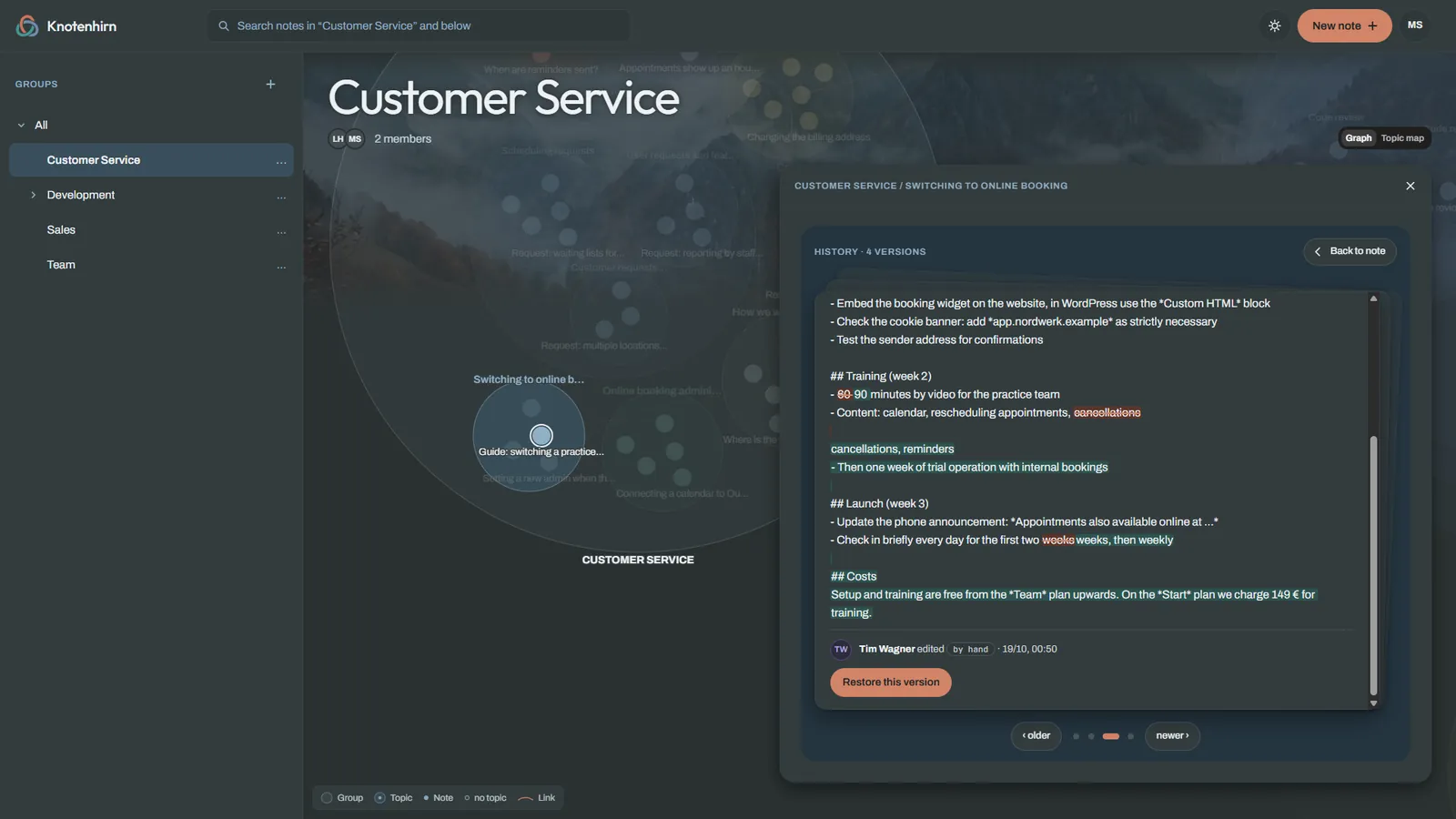
So a new person sees that a guide was extended last month, and by whom. Whoever last changed a note is often the right person for a follow-up question. The question is then more focused and costs both of them less time.
An example for the first weeks
An example: a new colleague starts in customer service. She signs in with her Microsoft or Google account, and an admin approves her. Groups decide which notes she sees, and her AI agent sees only what she may see. On the first day she reads the handbook in the wiki. From the second day on, for customer requests she first asks her AI agent, which searches Knotenhirn.
For a question about a major customer, the agent finds nothing. She asks a colleague who knows the agreement and then writes the note herself. By the end of her first week she has created a few notes. The next new person finds the answers without asking, and the colleague does not have to explain the agreement again.
How to get started
- Create your team and share the team link. You approve who joins.
- Ask the experienced people to write down the three questions newcomers ask them most often.
- Agree that every answer that is written nowhere gets recorded as a note.
- Connect your AI agents as the Connect MCP guide describes.
Try it with your team
Try Knotenhirn free for 14 days, with no payment details. The trial does not turn into a subscription automatically.