 Knotenhirn
Getting support knowledge out of people's heads
Updated 6 November 2026 · by Michael Schwarz
You get support knowledge out of people's heads by capturing every solved request that may come back, once, as a short note: what the customer sees, what the cause is, what helps and who it applies to. When these notes sit in one place that everyone on the team and your AI agent search, the next person finds the solution themselves instead of asking the one colleague who has it in her head.
Where support knowledge lives today
Every support team has its handful of people who have seen almost everything before. They know that a certain error shows up after every update and disappears with a reload. They know which customer has a special agreement and whose password must not be reset by email. Little of this is written down.
The ticket system helps only so far. It records individual cases, with all the back and forth. The actual solution is somewhere in the middle of a thread, and whoever needs it has to find the right ticket first. The wiki, in turn, holds the big handbooks and processes. Hardly anyone creates a page there for the workaround that has applied since last week.
You feel it in shifts, during holidays and when people change teams. Whoever is on duty writes in the chat and waits, or solves the problem a second time from scratch.
What a good support note looks like
A support note is short and can be written in a minute while the case is still fresh. A sensible structure:
- A title in the customer's words, such as “Confirmation email ends up in spam”, not in internal terms.
- The steps that help, in the order in which you check them.
- The cause, as far as you know it, so nobody draws the wrong conclusions.
- Who it applies to: all customers, one plan, one version or a single customer.
- Since when it applies, if something may change again soon.
That is all it takes. An unfinished note that someone completes later helps more than a page that never gets written.
Searching the way customers ask
Customers describe the same problem in many ways. One writes that they are not getting emails, the next that the confirmation never arrived. The search in Knotenhirn combines full text and meaning, so a question matches a note even when the words differ.
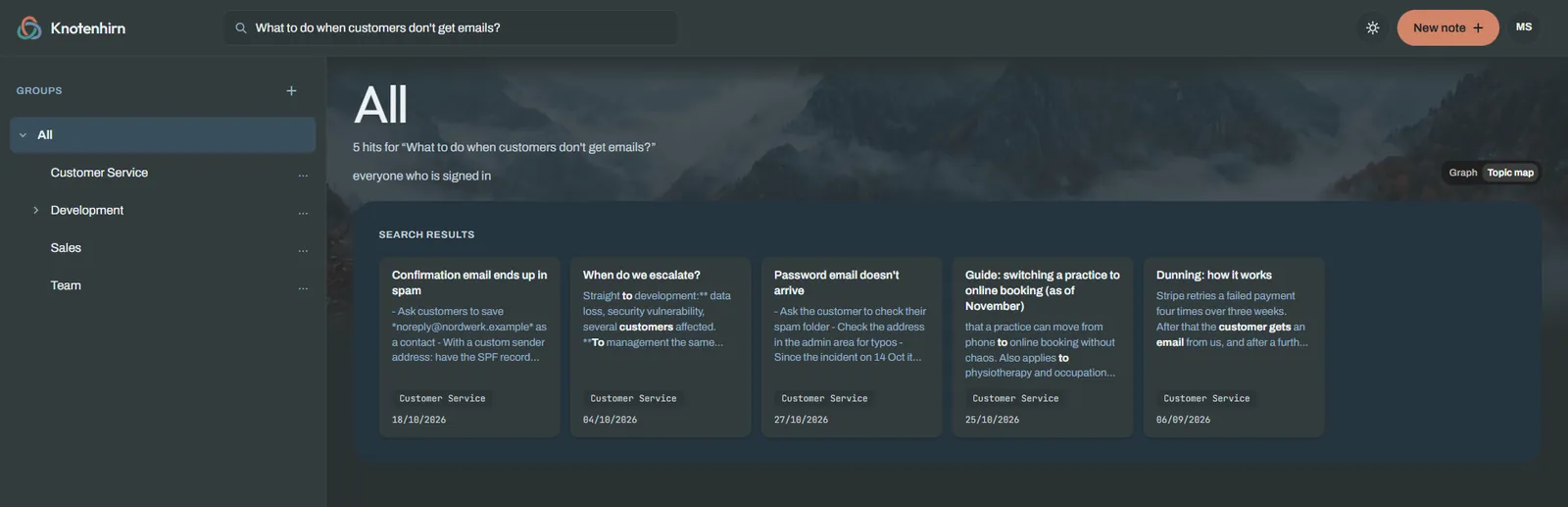
The same search is open to your AI agents. Anyone in support who works with Claude Desktop or another client connects it to Knotenhirn via MCP. When you then ask what to check when emails are missing, the agent answers with the steps from your notes and names them as its source. So you see where the answer comes from and can check it.
An example from a shift
An example: in the morning, several customers report that their appointment confirmations are not arriving. A colleague finds out that the email provider has throttled the sending rate, and sorts it out. Before he closes the case, he asks his AI agent to record it: what the customers saw, how long it lasted, what the cause was and what to tell them if it happens again. After saving, Knotenhirn names similar notes to the agent so it can extend or merge them instead of leaving duplicates.
Two weeks later, another colleague is on duty, and the problem comes back. She searches for missing emails, finds the note and replies within a few minutes. She does not need to reach the colleague who solved it back then.
Keeping the knowledge up to date
Support knowledge goes out of date quickly. A workaround applies until the next update, a customer agreement until the contract ends. That is why it helps that every note has its history: you see who changed it and when, in the browser or through an AI agent, and you can restore an earlier version. Whoever finds a note that is no longer right changes it straight away.
Agreements with individual customers are not meant for everyone. Groups decide who sees which notes. You can therefore assign agreements with individual customers to a group, and an AI agent sees only what the connected person may see.
And you see what is missing: when an AI agent finds nothing for a question, Knotenhirn collects it under knowledge gaps. Questions that come up there more often are the next notes worth writing.
An addition, not a rebuild
Your ticket system stays for the cases, your wiki for handbooks and processes. Knotenhirn takes in what used to live only in people's heads in between. Any client from the Connect MCP guide can be connected.
Try it with your team
Try Knotenhirn free for 14 days, with no payment details. The trial does not turn into a subscription automatically.